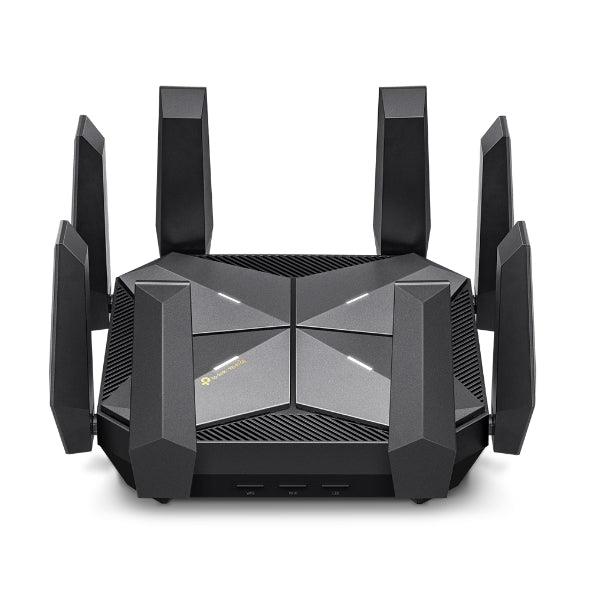
TP-Link Archer AXE300 AXE16000 Quad-Band Wi-Fi 6E Router
$799.00
Description
TP-Link Archer AXE300 AXE16000 Quad-Band Wi-Fi 6E Router
Our Fastest Wi-Fi 6E and Wi-Fi 6 Router to Date: Up to 15.6 Gbps Quad-Band WiFi for faster browsing, streaming, and downloading, all at the same time.
WiFi 6E Unleashed: The brand new 6 GHz band brings more bandwidth, faster speeds, and near-zero latency.
Two 10G Ports: 1× 10 Gbps WAN/LAN port + 1× 10 Gbps Ethernet/Fiber Combo WAN/LAN port + 1× 2.5 Gbps WAN/LAN port + 4× Gigabit LAN ports + 1× USB 3.0 port ensure max flexibility and boosted throughput.
Powerful CPU: 2.0 GHz quad-core processor and 1 GB RAM ensure fast transmission speeds and smooth operation of numerous devices and applications.
Maximized Coverage: 8× high-performance dual-band antennas along with Beamforming boost WiFi signals throughout your home.
More Devices with Less Lag: OFDMA and MU-MIMO technology deliver data to multiple devices, simultaneously.
TP-Link HomeShield: Enhanced security defends against the latest cyber threats.
Specifications:
WIRELESS
Standards
• IEEE 802.11ax 6 GHz,• IEEE 802.11ax/ac/n/a 5 GHz,• IEEE 802.11ax/n/b/g 2.4 GHz
WiFi Speeds
AXE16000• 6 GHz: 4804 Mbps (802.11ax)• 5 GHz-1: 4804 Mbps (802.11ax)• 5 GHz-2: 4804 Mbps (802.11ax)• 2.4 GHz: 1148 Mbps (802.11ax)
WiFi Range
4 Bedroom Houses8× Fixed High-Performance AntennasMultiple antennas form a signal-boosting array to cover more directions and large areasBeamformingConcentrates wireless signal strength towards clients to expand WiFi rangeHigh-Power FEMImproves transmission power to strengthen signal coverage4T4RMultiple streams in the same band strengthen the fault tolerance in transmission
WiFi Capacity
Very HighQuad-BandAllocate devices to different bands for optimal performance4×4 MU-MIMOSimultaneously communicates with multiple MU-MIMO clientsOFDMASimultaneously communicates with multiple clientsAirtime FairnessImproves network efficiency by limiting excessive occupationDFSAccess an extra band to reduce congestion16 StreamsConnect your devices to more bandwidth
Working Modes
• Router Mode• Access Point Mode
HARDWARE
Processor
2.0 GHz Quad-Core CPU
Ethernet Ports
• 1× 10 Gbps RJ45/SFP+ Combo WAN/LAN Port§• 1× 10 Gbps WAN/LAN Port§• 1× 2.5 Gbps WAN/LAN Port§• 4× 1 Gbps LAN Ports
USB Support
1× USB 3.0 Port• Supported Partition Formats:NTFS, exFAT, HFS+, FAT32• Supported Functions:FTP ServerMedia ServerSamba Server
Buttons
• Power On/Off Button• Wi-Fi On/Off Button• LED On/Off Button• WPS Button• Reset Button
Power
12 V ⎓ 5 A
SECURITY
WiFi Encryption
• WPA• WPA2• WPA3• WPA/WPA2-Enterprise (802.1x)
Network Security
• SPI Firewall• Access Control• IP & MAC Binding• Application Layer Gateway• HomeShield SecurityReal-Time IoT ProtectionMalicious Site BlockerIntrusion Prevention SystemDDoS Attack PreventionHome Network Scanner
Guest Network
• 1× 6 GHz Guest Network• 1× 5 GHz-1 Guest Network• 1× 5 GHz-2 Guest Network• 1× 2.4 GHz Guest Network
VPN Server
• OpenVPN Server• PPTP VPN Server• L2TP VPN Server
VPN Client
• Open VPN Client• PPTP VPN Client• L2TP VPN Client
SOFTWARE
Protocols
• IPv4• IPv6
Service Kits
HomeShieldLearn More>
OneMesh™
OneMesh™ SupportedWithout replacing your existing devices or buying a whole new WiFi ecosystem, OneMesh™ helps you create a more flexible network that covers your entire home with TP-Link OneMesh™ products.Learn More>All OneMesh Products>
Parental Controls
HomeShield Parental ControlsCustom ProfilesProfessional Content Filter LibraryFamily TimeBedtimeOff TimeTime RewardsFamily Online Time RankingPause the InternetWeekly and Monthly Reports
WAN Types
• Dynamic IP• Static IP• PPPoE• PPTP• L2TP
Quality of Service
QoS by Device
Cloud Service
• Auto Firmware Upgrade• TP-Link ID• DDNS
NAT Forwarding
• Port Forwarding• Port Triggering• DMZ• UPnP
IPTV
• IGMP Proxy• IGMP Snooping• Bridge• Tag VLAN
DHCP
• Address Reservation• DHCP Client List• Server
DDNS
• TP-Link• NO-IP• DynDNS
Management
• Tether App• Webpage
OTHER
System Requirements
Internet Explorer 11+, Firefox 12.0+, Chrome 20.0+, Safari 4.0+, or other JavaScript-enabled browserCable or DSL Modem (if needed)Subscription with an internet service provider (for internet access)
Certifications
FCC, RoHS
Environment
Operating Temperature: 0℃~40℃ (32℉ ~104℉)Operating Humidity: 10%~90% non-condensing
TEST DATA
WiFi Transmission Power
FCC: < 30 dBm (2.4 GHz), < 30 dBm (5 GHz), ≤ 25 dBm (6 GHz)
WiFi Reception Sensitivity
2.4 GHz:11ax HE20 MCS0: -97dBm, 11ax HE20 MCS11: -66dBm11ax HE40 MCS0: -95dBm, 11ax HE40 MCS11: -64dBm5 GHz-1:11ax HE20 MCS0: -93dBm, 11ax HE20 MCS11: -62dBm11ax HE40 MCS0: -91dBm, 11ax HE40 MCS11: -60dBm11ax HE80 MCS0: -88dBm, 11ax HE80 MCS11: -57dBm11ax HE160 MCS0: -82dBm, 11ax HE160 MCS11: -52dBm5 GHz-2:11ax HE20 MCS0: -95dBm, 11ax HE20 MCS11: -64dBm11ax HE40 MCS0: -93dBm, 11ax HE40 MCS11: -62dBm11ax HE80 MCS0: -90dBm, 11ax HE80 MCS11: -59dBm11ax HE160 MCS0: -84dBm, 11ax HE160 MCS11: -53dBm6 GHz:11ax HE20 MCS0: -95dBm, 11ax HE20 MCS11: -65dBm11ax HE40 MCS0: -93dBm, 11ax HE40 MCS11: -62dBm11ax HE80 MCS0: -90dBm, 11ax HE80 MCS11: -58dBm11ax HE160 MCS0: -84dBm, 11ax HE160 MCS11: -53dBm
PHYSICAL
Dimensions (W×D×H)
9.1 × 9.1 × 2.7 in(232 × 232 × 68 mm)
Package Contents
• Wi-Fi Router Archer AXE300• Power Adapter• RJ45 Ethernet Cable• Quick Installation Guide
Key Features:
WiFi 6E: A Freer and Faster Future
WiFi 6E introduces the brand new 6 GHz band without any overlap or interference from other bands and older devices. This means a congestion-free frequency that offers more bandwidth, faster speed, and lower latency.
Two 10G Multi-gig Ports
Equipped with two 10G WAN/LAN ports—one RJ45 port and a RJ45/SFP+ combo port—Archer AXE300 provides flexible support for both fiber and copper connections. WAN/LAN options and flexible 10 Gbps, 2.5 Gbps, and 1 Gbps ports make it an ideal solution for future-proofing your home network. Its USB 3.0 port offers up to 10× faster transfer speeds than USB 2.0.
Industry-Leading CPU, Powerful Processing
The state-of-the-art 2.0 GHz quad-core 64-bit CPU with 1 GB RAM memory handles huge throughput to eliminate lag. Enjoy fast connections and minimal latency even under the heaviest transmission loads.
Boosted WiFi Coverage Throughout Your Home
8× high-performance dual-band antennas boost WiFi signals throughout your home. Beamforming technology detects devices and concentrates signals towards them, especially to previously hard-to-reach areas
Massively Expanded Device Capacity
The number of IoT devices today creates greater demands on home networks. Archer AXE300 future-proofs your home WiFi with a higher capacity of up to 200+ devices.
TP-Link OneMesh™ : Flexibly Create Whole Home WiFi with Archer AXE300
OneMesh™ is a simple way to form a mesh network with a single WiFi name for seamless whole home coverage. Just connect a OneMesh™ range extender to a OneMesh™ router. No more searching for a stable connection.
WiFi Dead Zone Killer
Eliminate weak signal areas with WiFi coverage for the whole house
Smart RoamingEliminate weak signal areas with WiFi coverage for the whole house
One WiFi Name
No more switching WiFi network names
Unified ManagementManage your whole home WiFi from the central node via the Tether app/Web UI
Your Security is Our Priority
With TP-Link HomeShield, enjoy advanced security features that deliver a safe environment that protects your family and network’s data and privacy.
Upgrade to HomeShield Pro
– DDoS Attack Prevention
– IoT Device Protection- Advanced Parental Controls including Time Rewards
VPN Clients and Server Supported
Allow devices in your home network to access remote VPN servers without needing to install VPN software on every device. Archer AXE300 can run both the VPN and ordinary internet connections at the same time, delivering security and flexibility.
Easy Setup and Use
Whether you prefer the intuitive Tether app or TP-Link’s powerful web interface, you can set up your Archer axe300 in minutes. The Tether app allows you to manage network settings from any Android or iOS device.
Protect Your Children
Block inappropriate content for your children, and customize a time range for better online habits.
New Connection Notifications
You will be notified by your phone when new devices connect. Kick off any suspicious connections and block them. It’s as simple as that.
Easy Firmware Upgrades
Tired of upgrading firmware manually? OTA updates simplify firmware upgrades with a click in the management panel. To keep your security and functions always up to date, just turn on the auto schedule.
You must be logged in to post a review.
Related products
-
Sale!

TP-LINK TL-WN821N networking card WLAN 300 Mbit/s
Original price was: $17.00.$15.00Current price is: $15.00. Select -
TP-Link Archer T3U Plus Wireless AC1300 USB Adapter
$44.00 Select -
TP-Link TL-WR902AC AC750 Wireless Travel Router
$49.00 Select -
Sale!
TP-Link TL-SG105PE 5 Port Gigabit Easy Smart PoE+ Switch with 4 ports PoE+
Original price was: $69.00.$59.00Current price is: $59.00. Select
Reviews
There are no reviews yet.